BestInternetSecurity.net

Information Security Resources

Cryptography – Revisited

Cryptography, or cryptology, derived from the Greek words for “hidden” writing or speaking, is the practice and study of hiding information.

Until modern times, cryptography referred almost exclusively to encryption, the process of converting ordinary information (plain text) into unintelligible gibberish (confidentiality). Cryptography is now considered to be a branch of both mathematics and computer science, and is closely related to the study of information theory, computer security, and engineering. Now we apply this technology to achieve the other two objectives – integrity (using a digital signature) and availability (protecting the data from being corrupted and destroyed).

The key, a parameter that determines the functional output of a cryptographic algorithm, is the important element of cryptography. In encryption, a key specifies the particular transformation of plaintext into ciphertext (or vice versa during decryption).

This concept was introduced in cryptography in 1466 by Leon Battista Alberti, the famous Italian Renaissance architect.

Let’s consider a parallel situation in the physical world to describe how a key works in cryptography. Your own front door lock is mass produced by a company, and each lock is sold with a unique key that works only with the door locking mechanism within the door lock that it is designed for. Other people may own the same lock model made by the company, with the same basic locking mechanism. However, you are the only one who can unlock the door because your key, which is different from the keys of other people, is the only one in the world that fits the specific combination design inside of your door lock, making your home secure (theoretically!).

Computer security works in a similar way. A key used to “unlock” a cryptographic algorithm. And the longer the key, the more difficult it is to break into the system by trial and error. The hacking technique of attempting to break a cryptographic algorithm by trial and error is called a brute force attack, and the time and effort needed to break the system is called the work factor.

For more information about cryptography, refer to various posts in the blog found here:

http://www.bestinternetsecurity.net/category/cryptography/

Tags: Cryptographic Key More news by category Topic -: Buy phentermine saturday delivery ohio Tramadol hydrochloride tablets Picture of xanax pills Free shipping cheap phentermine Buying phentermine without prescription Safety of phentermine Pyridium Generic viagra cialis Cialis generic india Pink oval pill 17 xanax identification Buy free phentermine shipping Best price for generic viagra Information about street drugs or xanax bars Ordering viagra Snorting phentermine Hydrocodone overdose Lithium Amiodarone Get online viagra Order viagra prescription Order xanax paying cod Cheap phentermine free shipping Imiquimod Tramadol next day Linkdomain buy online viagra info domain buy onlin Pfizer viagra sperm Vidarabine Cheapest viagra price Prevacid Viagra cialis levitra comparison Dutasteride Lisinopril Thiotepa Female spray viagra Black market phentermine Betamethasone Cialis forums What does xanax look like Loss phentermine story success weight Order xanax overnight Viagra alternative uk Diet online phentermine pill Order xanax cod Mecamylamine Eulexin Cheap hydrocodone Buy cheapest viagra Viagra xenical Phentermine with no prior prescription Xanax in urine Macrodantin Cheap phentermine with online consultation Epivir Buy phentermine epharmacist Ditropan Woman use viagra Cialis erectile dysfunction Xanax withdrawl message boards Viagra online store Atorvastatin Generic ambien Is phentermine addictive Next day delivery on phentermine Buy online viagra Ethanol Natural phentermine Avandamet Xanax long term use Diet page phentermine pill yellow 5 cheap Cheapest secure delivery cialis uk Information medical phentermine Cialis experience Phentermine no perscription Compare ionamin phentermine Viagra cialis levivia dose comparison Noroxin Effects of viagra on women Buy cheap cialis Viagra shelf life Hydroxyurea Phentermine discount no prescription Buy cheap online viagra Dog xanax Online cialis Viagra class action Viagra price Phentermine without prescription and energy pill Hydrocodone cod only Nicoumalone Cheapest viagra Cheap ambien Vicodin without prescription Phentermine prescription online Phentermine snorting Mirtazapine Quazepam Isradipine Buy generic viagra online Xanax look alike Moxifloxacin Viagra experiences Piroxicam Nicorette Free try viagra Sotalol Cash on delivery shipping of phentermine How do i stop taking phentermine Xanax prescriptions Cheapest phentermine 90 day order Niacinamide Phentermine weight loss Phentermine

The Nuts and Bolts about Intrusion Prevention System (IPS)

An Intrusion Prevention System (IPS) is a computer security device that monitors network and/or system activities for malicious or unwanted behavior and can react, in real-time, to block or prevent those activities. It is an in-line device that scans traffic and, based on a set of rules, determines whether data packets are legitimate or malicious. An IPS is based upon an Intrusion Detection System (IDS), with the added component of taking real time action to prevent an intrusion once detected by the IDS.

In case you are unfamiliar with IDSs, refer to my posts here:
http://www.bestinternetsecurity.net/19/
http://www.bestinternetsecurity.net/18/

IPS System

The term “Intrusion Prevention System” was coined by Andrew Plato, who was a technical writer and consultant for NetworkICE.1 While these systems were originally an extension of Intrusion Detection Systems (IDSs), which focus on detection only, today’s IPSs are designed to stop attacks and intrusions in real time, protecting valuable assets.

Attacks

An IPS won’t protect you against password attacks or Trojan horse attacks, such as screen capturing and keyloggers, etc. However, there are still many reasons you might want to use an IPS. Among these are extra protection from denial-of-service attacks and protection from many critical exposures found in software such as Microsoft Windows. An IPS device must utilize “Stateful Inspection” (a firewall technology) to perform advanced protection against new types of attacks, as well as defend against the growing frequency and scale of Distributed Denial of Service (DDoS) attacks.  The IPS prevents a large amount of downtime that would occur if nonexistent, by stopping any damage that may have made its way to the databases from internal or even external attacks. The most significant advantage offered by inline IPS technologies is that attacks are detected as they occur.

IPS And Firewall

While some IPS products have the ability to implement firewall rules, this not a core function of the product. Also, some application layer firewalls have integrated IPS-style signatures into their products to provide real-time analysis and blocking of traffic. Other closely related terms include “Unified Threat Management” (UTM), sometimes called “Next Generation Firewalls.”

Commercial IPS Products

There are just a few examples of IPS systems on the market today:

Check Point IPS-1 is a hybrid IDS/IPS solution with management features that include the company’s Dynamic Shielding Architecture for vulnerability alerts and Confidence Indexing.

McAfee IntruShield is a purpose-built intrusion detection/prevention appliance performing up to 10 Gbps packet analysis, which will continue to be enhanced through the company’s risk management strategy including NAC integration. The company recently announced the availability of a Windows VMWare version of Strata Guard Free, a freeware version of its intrusion prevention system.

3Com’s TippingPoint IPS System provides Application Protection, Performance Protection, and Infrastructure Protection at gigabit speeds through total packet inspection.

IPS Technologies

A considerable improvement over firewall technologies, IPS can make access control decisions based on application content rather than IP addresses or ports, as traditional firewalls do. But that also implies that IPSs are slower in performance.

An IPS must also be a very effective Intrusion Detection System in order to enable a low rate of false positives. Just like IDSs, when deploying network-based IPSs (NIPSs), consideration should be given to whether the network segment is encrypted, since not as many products are able to support inspection of such traffic.

According to some news sources regarding a new breed of IPS – the “Distributed IPS” – an IPS’s automatic responses can range from throttling inappropriate traffic and/or blocking individual user/device access, assigning packets to a quarantine VLAN, or turning off the port.2

Customization and Performance Issues

The design and configuration of an IPS is a major part in the effective use of the hardware and software available on the market today. Therefore, I’ll address some key issues for an efficient IPS.

If the IPS fails the flow of packets stops and the network becomes unavailable, this is something which should not be allowed to occur. The solution is to make sure that the product selected is able to maintain signatures, and also provides a well built interface that is easy to understand and navigate. Network administrators should be able to minimize false positives and false negatives by thoroughly training the IPS, taking care to not only train during the initial installation phase, but also continuing to train the system as it is online.

As time goes by, faster IPSs will be created. In fact, most IPSs available today can handle up to a gigabit of traffic. Network administrators should be aware of the bandwidth capabilities of each IPS and be sure to choose one suitable for their level of network traffic.

1http://www.safensoft.com/security.phtml?c=587
2http://www.enterasys.com/company/press-release-item.aspx?id=748

Tags: DOS, Denial of Service Attack, Distributed Denial of Service Attack, false negative

XOR and the One-Time Pad

Some of my students have asked why we always use XOR (Exclusive OR) in encrypting plaintext into ciphertext. To answer this question, please take a look first at the output of the various combinations of inputs for XOR function.

Input A Input B A XOR B
1 1 0
1 0 1
0 1 1
0 0 0

Suppose we have a plaintext of 1100001111100 and a key of any arbitrary binary number 0001111001000 of the same length. If we XOR them together to give a ciphertext, the ciphertext is:

Plaintext 1100001111100
Key 0001111001000
XOR Output 1101110110100

The XOR output is the ciphertext.

If we now apply the XOR function to the ciphertext with the same key:

Ciphertext 1101110110100
Key 0001111001000
XOR Output 1100001111100

The XOR output becomes the original plaintext.

So you can see, the XOR function serves exactly what a symmetric encryption does.

We encrypt (XOR) the original message into the cipher message with any chosen key. Then we can decrypt (XOR) the cipher message back to the original one with the same key.

If you study a lot of symmetric encryption algorithms like DES, you will note that XOR functions play a very important role in the encryption process.

Perhaps the safest encryption system we can now do with symmetric encryption is the so called “One-Time Pad.” This refers to using an infinite long key to XOR with your original message to give a cipher message. If you do not repeat the bit sequence of the encryption key used in your subsequent encryptions, then there is no way a hacker can uncover the original message from ciphertext unless s/he has the same set of one-time pad (the encryption key) that you have. Claude Shannon proved, using information theory considerations, that the one-time pad has the property he termed perfect secrecy.

But of course, practically, it’s not feasible if not impossible to use one-time pad. This is because the receiver needs to process the same identical one-time pad as what you have in order to decrypt the message. You may have a hard time transmitting the one-time pad to the receiver beforehand, considering that it has to be of a length that is long enough to fulfill your present and all future communication needs with the receiver.

The most interesting example of one-time pad I can think of is in the movie “Crimson Tide” with Denzel Washington. This movie is about a US Navy submarine. In the Navy, whenever a submarine is set out for a mission, it has to carry a pre-arranged decoding key (the one-time pad) for decoding the commander’s message sent to it during the mission’s journey. The one-time pad has to be long enough to cover the needs to decrypt all urgent messages of command within that journey. In this movie, the decoded message is about whether the submarine will launch the missile attack on its enemy which will provoke war! So you can see the decoding system is a crucial setup within the navy’s submarine operations.

Of course, whenever the submarine comes back to its base station, it has another chance to “refresh” the one-time pad stock to allow the decoding to be carried out in the next journey.

The one-time pad can never be reused. Otherwise, it will defeat its prime protection feature of being unbreakable by hackers because the keys used appear to be totally random in nature (as there is no repeating sequence). So there is no way the hacker can guess what it is.

And the random generator that generates each one-time pad has to be carefully designed. If somehow, it fails to produce a one-time pad with truly random combinations of 0s and 1s, the encryption key generated from it could be broken. Although I cannot locate the source anymore, I once came across some literature describing an instance during World War II, when the German’s one-time pad encryption system was broken because of an inherent weakness in its one-time pad generator that perhaps was generating one-time pads with statistical bias towards the bit sequence, allowing the allies to finally break the system.

Tags: pseudo-random number generator

Re-Conceptualizing Security

Yesterday morning, I managed to find some time to attend the 9th INFOSECURITY CONFERENCE in Hong Kong. One of the keynote speakers was Bruce Schneier, a security guru and founder and CTO of BT Counterpane – an information Security firm offering managed security services. Bruce, the author of several best-selling books on the subject, presented an excellent talk on his views about security concepts. Some of his books that I have on my shelf are: Applied Cryptography, Secrets and Lies, and the recently published Beyond Fear.

Bruce began the discussion by stating the difference between two types of security in our lives. One type has to do with what you feel about security, and other type is about the reality of security.

These are two separate things. You can feel secure yet not actually be secure. On the other hand, you can have real security but not feel it. These two tend to diverge from each other. But what surprises us is that in linguistics, we do not find two different words to describe these two types of security. We have only one word in English and it seems the situation is quite similar in other languages.

Perhaps the reason for this is that in the ancient world, while our languages were being developed, these two types did always go together. You can observe the physical environment with your five senses and judge whether it is secure or not. So essentially you feel secure when you really do in fact have physical security.

But today in the information world, these two types of security do not go together all the time. We have security measures installed in our information systems that “safeguard” our information assets, even when we do not actually “see” or “feel” them.

What is worrisome is that most of the time we may not actually “feel” there is lack of security in our system when in fact it does contain serious security flaws.

So the first thing we need to do in regards to security is educate people to be more aware of the need for security. Educate them so they have the knowledge necessary to “see” the security measurements installed in their systems.

What helps us do this, according to Schneier’s idea, is to use “systems” to explain the security implementations in our society. System refers to the simplification of the real world situation into models, to help people understand in a simpler way how something works. For example, we can explain the mechanism of a camera surveillance system in a way that helps people understand its value in not only monitoring a crime taking place, but also in helping to deter the crime from happening as well, since criminals know that its presence increases the risk of being caught.

By helping people understand the working mechanism behind a camera surveillance system, people are more likely to support its implementation, and to be less likely to object to the concern about privacy issues involved with a surveillance system.

As I have always emphasized, successful security management has to first be built on the trust, support, and understanding of people. After all, it is always a tradeoff to obtain security. You need to forgo first convenience, and second, the time and money invested in the security system in exchange for something you cannot really “feel,” even when has been properly put into place.

So security is kind of a “second thought” in many people’s minds. People tend to think of many excuses not to commit to the best security practices simply because they don’t really feel insecure, even when they do not have proper security measures in place.

All in all, I think Bruce used a very good approach to present this idea at the conference. If you want know more about Bruce Schneier, visit his personal website here: http://www.schneier.com/.

For details of the conference, please visit: http://www.infosecurityproject.com/

Tags: Information Security Awareness

Instant Linux Security Tools

How can I get Linux security tools installed on my Windows Desktop instantly? Answer: Using VMware

Using VMware, now you can easily try out Linux security tools. Read on…

As I said in my previous post, VMware allows you to instantly install another instance of an OS on your computer system. In the case of Internet Security related tools, most are run on Linux platforms, such as these popular softwares:

  • Dsniff (packet sniffer)
  • John the Ripper (password cracker)
  • NmapFE (Nmap)
  • Chkrootkit (check for rootkits, etc.)

In the past, I’ve had to ask my students to install Linux on their original Windows computers before they can try out these software tools. But now, you can easily download the various VMware OS images of Linux to be run on your computer.

If you need to install the latest version of Fedora, Ubuntu, or Suse Linux to install your particular security tool, go straight to this link:
http://www.vmware.com/vmtn/appliances/directory/cat/45
and download your favorite Linux OS images.

VMware uses the term “Virtual Appliances” for all those preconfigured application images to be run directly on VMware software. There are a lot of people contributing to the creations of different Virtual Appliances now.

If you are a bit lazy and want an all-in-a-box solution, you can get some OSs with preconfigured security tools, such as with this link:
http://www.vmware.com/appliances/directory/1065 for Vulnerability Assessment, Intrusion Detection, and more.

Or try this one:
http://www.vmware.com/appliances/directory/348 for all the security tools you can imagine, such as Dsniff, John the Ripper, NBTscan, Nessus, NetCat NmapFE, Saint Scanner, Snort , ethereal, and more.

Of course, you can also look for other possible security related virtual appliances here:
http://www.vmware.com/appliances/directory/cat/47

Enjoy the convenient test environment brought to you by VMware!

Tags: John Ripper

Anti Spam Filtering Using Gmail

Anti Spam Filtering using Gmail? Why?

anti spam filtering

anti spam filtering

I have been using Gmail, Yahoo! Mail, and Hotmail for very long time. My general feeling is that the super-powerful anti spam filtering capability of Gmail is unprecedented. It can eliminate almost 98% of spam emails while at the same time maintaining an almost zero error rate of filtering legitimate emails. It definitely outperforms the other two free email systems.

I am always curious how it achieves this phenomenal success rate, but I find no clue at all. Having had no success in finding its algorithm, I turn to a very practical question: How we can make use of its powerful anti spam filtering capability to handle our daily corporate email reception task?

The first solution is to use Gmail for receiving emails from your contacts. That sounds easy and straightforward, but the downside is that you have to give up the corporate email address that signifies your corporate identity. How can we preserve that?

Here is a quick solution you can try. Since Gmail allows email received to be forwarded to another email address, you can follow these steps to set this up.

First, you’ll need to create the following three email addresses for each staff member of your company:

  1. The primary corporate e-mail, which is shared with contacts. Say, for John Doe of your company XYZ Inc., you can john.doe@xyz.com.
  2. A second corporate e-mail, called john.doe_filtered@xyz.com. (You’ll see the use of this second e-mail in a few minutes.)
  3. A Gmail account, with an address similar to: john.doe-xyz@gmail.com

Next, configure the first, primary email address to forward email to the Gmail address.

In the Gmail account settings for the Gmail email address, select the option “Forwarding and POP/IMAP” as shown below:

You will see the following screen:

anti spam filtering setup - Step 2

Set this to forward to the second corporate email address of your staff (i.e., the john.doe_filtered@xyz.com address, as shown in the above screen capture).

Now John Doe can configure his email client to read spam filtered email from the second email account. Those emails are originally addressed to his primary email address, filtered by Gmail, then automatically forwarded to his second corporate email account.

What John needs to remember is to make sure the email address john-doe_filtered@xyz.com is hidden from his contacts. He only uses it as a tool to receive the filtered emails.

If you really want to own the Gmail account as a private labeling service to your company (and that entitles you to own the big storage space of Gmail for each of your private corporate email account and also the spam filtering service), you can register for a private label email program through Google Apps here:
http://www.google.com/a/help/intl/en/index.html

However, this involves pointing all your corporate emails to Google’s Server for storage and processing. I am not so sure if this is a good idea for your company, although this service is basically free with an option to pay a small fee to receive technical support service.

Using VMware for Desktop and Server Security

Last year, a student of mine presented a very good topic on desktop security by VMware. I think it is a good idea to share with you this idea of using virtualization for desktop security.

If you are not familiar with VMware, take a moment to look at their website:

http://www.vmware.com

Desktop and server security is a common headache in modern IT security management, with most organizations having many PCs and Servers running different Operating Systems (OSs) with different customizations. If a particular piece of hardware runs into problem, a great amount of work is involved in recreating the same operating environment on another hardware platform.

This is where virtualization comes in – shining a light on this common problem.

VMware produces virtualization software – a special kind of software that helps a single piece of hardware to concurrently run several different instances of the same or different OSs. In effect, you have a single hardware platform operating several virtual machines using this company’s software.

Virtualization, as defined by VMware, is “an abstraction layer that decouples the physical hardware from the operation system to deliver greater IT resource utilization and flexibility”.

Actually, virtualization extends beyond this definition to cover applications and storage virtualization. There are some other definitions that you can compare and understand:

Virtualization is the creation of a virtual (rather than actual) version of something, such as an operating system, a server, a storage device or network resources.” –

SearchServerVirtualization.com

Virtualization is a technique for hiding the physical characteristics of computing resources to simplify the way in which other systems, applications, or end users interact with those resources…Virtualization lets a single physical resource (such as a server, an operating system, an application, or storage device) appear as multiple logical resources; or making multiple physical resources (such as storage devices or servers) appear as a single logical resource.” – About.com

From an economical point of view, this is great, since you can use the very single piece of physical computing hardware to run several logically separated pieces of OS. This can save money because there is no need to operate separate pieces of hardware for each OS.

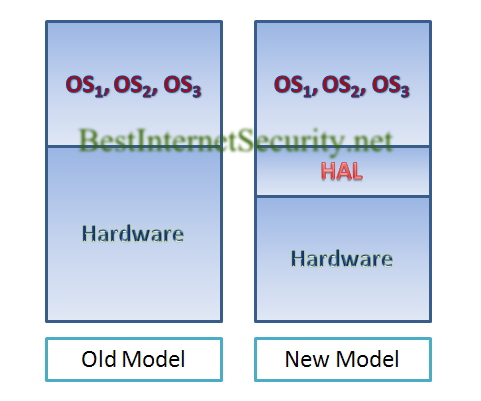
But I will stress from the security point of view, this is even greater news. Now you can separate the applications from the hardware by introducing virtualization software like VMware as a HAL (Hardware Abstraction layer).
Old and New Model


Your software is no longer tied to a particular hardware platform. If your hardware fails, you can migrate your hard-built software platform to another piece of hardware immediately without having to re-build the software from scratch to adapt to the new hardware platform.

From a security standpoint, this achieves the continuity of your desktop system since your software platform is now operating independently from the hardware platform. Among the three security objectives (namely: confidentiality, integrity, and availability) this achieves the last objective.

If you are in a hurry to migrate your existing well-built applications on common OS platforms to VMware HAL, you can try the free VMware Converter, found here: http://www.vmware.com/products/converter/.

And you can also use their free VMware Player to operate your converted VMware virtual machine, found here:  http://www.vmware.com/products/player/

Tags: WMWARE, Desktop Continuity, Server Continuity, Availabilty, Business Continuity

Google Hacking and Buffer Overflow Attacks: In the News

Recently I spotted a piece of news about a type of network attack combining techniques we have discussed in recent articles involving Google Hacking and Buffer Overflow Attack . The incident, according to Forbes News1 involves “using Google searches to track down sites vulnerable to so-called ‘SQL injections’.”

Essentially, the hackers use Google to hunt for sites with a problem in the web server program codes and exploit them using the knowledge gained from the error messages displayed on the problem websites. In this particular case, the hackers used the SQL command to take control of the sites under attack.

(If you are interested to know about how to work safely using SQL commands, read our post about Buffer Overflow Attack here: http://www.bestinternetsecurity.net/52.)

Some security experts attribute this situation to the usage of Microsoft-related technologies in web sites, such as Microsoft’s own Internet Information Servers (IIS) and its SQL server.

“Whitehat Security’s Grossman speculates that machines running that software were targeted because they allow several commands to be injected in a single user input field on the sites they host, making those sites easier to hijack,” according to Forbes News.

However, I have a different view, and this is the same comment that I expressed in my previous post: It does not matter what technologies you are using to run your websites. What does matter is taking extra care in writing programs that use SQL commands to manage program data. If in the original program design you fail to carefully validate users’ inputs, you will open doors to possible attacks. This is especially disastrous if you fail to do so with web application programming, like in the case we are discussing now.

But as I have also said, it is extremely difficult (if not totally impossible) to write completely bullet-proof code. But to be aware of what can happen if you do not take extra steps to write code that carefully lessens the risk of attack is more than half of the battle. Read the news in the reference section to know more about this case.

Reference:

1Greenberg, A. (2008), Google-Hacking Goes To China, Forbes.com LLC, Available from: http://www.forbes.com/2008/04/28/hackers-google-china-tech-security
-cx_ag_0428hack.html?partner=yahootix
[Accessed 28 April 2008]

Tags: SQL Programming, Application Security, Google Hacking, Buffer Overflow Attack

Are Two Firewalls Better than One?

Screened Subnet Architecture andFirewalls

A firewall’s function is to act as a gatekeeper, keeping Internet “bad guys” out of your internal network. Setting up an effective firewall requires careful planning.

In my view, the Screened Subnet Architecture is a preferred network setup for firewalls to protect your company’s network while at the same time allowing external visitors to access your public service hosts.

What is Screened Subnet Architecture?

Let’s take a look at how a typical Screened Subnet Architecture is setup:

Screened Subnet Architecture

From this diagram, note that there are two, not one, firewalls in the network structure.The exterior firewall is configured to allow external traffic to access the subnet section (Perimeter Network) where you have put the public service hosts (Bastion Hosts) such as your e-mail server, web server, and/or DNS server, for example. The Screened Subnet is  also called “DM Zone”  (demilitarized zone) or simply “DMZ”.The internal firewall acts a second gatekeeper to keep external visitors from directly coming into your internal corporate network.The subnet section where you have put the service hosts is called “Screened Subnet” or “Perimeter Network,” hence the name “Screened Subnet Architecture” has become used for this type of network architecture.

What is the benefit of using Screened Subnet Architecture for a firewall setup?

The advantage of this setup is that if your external hosts are exploited (as they could be since they are serving many external visitors’ requests and are exposed to a greater risk of being hacked), you still have the interior firewall as the second gatekeeper to defend the attacks of the hacker by the exploited hosts. Or if the exterior firewall has been compromised, then the interior firewall can still fend off the hackers’ possible direct intrusion to the corporate internal network.

There are variations of this network setup that serve similar functions. One variation uses a single firewall with three network interfaces: one for the external Internet connection, another for the Screened Subnet, and a third for the internal network. The firewall is configured to allow external visitors to visit the Screened Subnet only, without the authority to access the internal network interface.

Screened Subnet Architecture with one firewall

This setup, of course, saves the hassle of maintaining two firewalls, making it easier to concentrate on the security maintenance of one single firewall.

However, the disadvantage is that if this only firewall becomes compromised, chances are the attackers can gain access to the internal network by the firewall’s internal interface. This, of course, poses a great security risk to a corporate environment.

Tags:  Exploit Firewall, Firewall Attack, Firewall Hacking, Hacking Firewall

Buffer Overflow: How does it happen?

Buffer Overflow refers to what happens when an area of a program’s code is overwritten with new code using the technique of inputting data longer than the length expected when the program asks for input. This creates an overflow in the program’s buffer system, and causes the program to react negatively − sometimes even resulting in system crashes. Hackers can cause buffer overflows intentionally to sabotage systems.

This overflow of data can be written to a critical program area, such as where execution code was placed. With carefully planned code overwritten in this area, a hacker can seize control of the program and, as a result, the system where the program resides.

The main reason a hacker can do this is due to negligence in the programmer’s coding. We call these types of problems “bugs” in the program. A common bug that leads to the possibility of a hacker causing a buffer overflow is when a coder neglects to include proper validation of data type and length for user input into the program.

Some common programming tools such as SQL commands allow a user to input carefully crafted responses to embed a request that triggers the program to execute a nested SQL command.

A good example of this is demonstrated in the following situation:

Consider a program that asks a user for input to find the name of a student by his or her surname. A proper input will trigger the program to successfully search the database for a match to the Surname inputted by the user, and return all records matching that surname. For example, suppose the input variable is named S_NAME. The input will execute the following SQL command:

Select * from Student_Table Where Student_Table.Name = S_NAME
This command instructs the program to locate all records with surname equal to S_NAME.

If a skilled user inputs something for S_NAME such as as “Select Surname from Student_Table”, then the program may execute the unexpected nested SQL command as:

Select * from Student_Table Where Student_Table.Name = Select Surname from Student_Table

This literally instructs the program to locate all records for all surnames in the Student_Table, and this is certainly not the original intention of the programmer who wrote the code. Depending on the subsequent codes of this program, this could possibly list all of the student names in a row − or simply crash the program, if it does not know how to handle the command.

The fact that a hacker can do this depends on three factors:

  • The hacker is an experienced SQL command writer
  • The hacker understands the underlying database structure of the program
  • The program does not exercise a careful input validation to verify the validity of the inputs

For the second factor, a hacker can come to understand the database structure in a lot of different ways. As we have noted in previous posts, most hackers are insiders of an organization. As such, they are able to gain access to related knowledge that aids in hacking. Another technique, Google hacking, is also an effective technique for hackers. (Click here to read our post on Google hacking.)

In the third factor, we’re talking about a bug in the program. If you have ever written computer programs, you probably understand that it is difficult − if not impossible − to write a bug-free program. Program input validation involves the consideration of so many exceptional input violation cases that a programmer cannot possibility foresee all of them. As long as even just one single case is missed (which usually is the case), the input process can be put into risk.

Throughout computing history, there are many examples of system exploitations by buffer overflow. Perhaps the most wide-spread example for Windows OS is one that happened in 2001, named “Code Red.”

If you are interested to know more about buffer overflow security incidents, refer to the information in Wikipedia:
http://en.wikipedia.org/wiki/Buffer_overflow