
Using VMware for Desktop and Server Security
Last year, a student of mine presented a very good topic on desktop security by VMware. I think it is a good idea to share with you this idea of using virtualization for desktop security.
If you are not familiar with VMware, take a moment to look at their website:
Desktop and server security is a common headache in modern IT security management, with most organizations having many PCs and Servers running different Operating Systems (OSs) with different customizations. If a particular piece of hardware runs into problem, a great amount of work is involved in recreating the same operating environment on another hardware platform.
This is where virtualization comes in – shining a light on this common problem.
VMware produces virtualization software – a special kind of software that helps a single piece of hardware to concurrently run several different instances of the same or different OSs. In effect, you have a single hardware platform operating several virtual machines using this company’s software.
Virtualization, as defined by VMware, is “an abstraction layer that decouples the physical hardware from the operation system to deliver greater IT resource utilization and flexibility”.
Actually, virtualization extends beyond this definition to cover applications and storage virtualization. There are some other definitions that you can compare and understand:
“Virtualization is the creation of a virtual (rather than actual) version of something, such as an operating system, a server, a storage device or network resources.” –
SearchServerVirtualization.com
“Virtualization is a technique for hiding the physical characteristics of computing resources to simplify the way in which other systems, applications, or end users interact with those resources…Virtualization lets a single physical resource (such as a server, an operating system, an application, or storage device) appear as multiple logical resources; or making multiple physical resources (such as storage devices or servers) appear as a single logical resource.” – About.com
From an economical point of view, this is great, since you can use the very single piece of physical computing hardware to run several logically separated pieces of OS. This can save money because there is no need to operate separate pieces of hardware for each OS.
But I will stress from the security point of view, this is even greater news. Now you can separate the applications from the hardware by introducing virtualization software like VMware as a HAL (Hardware Abstraction layer).
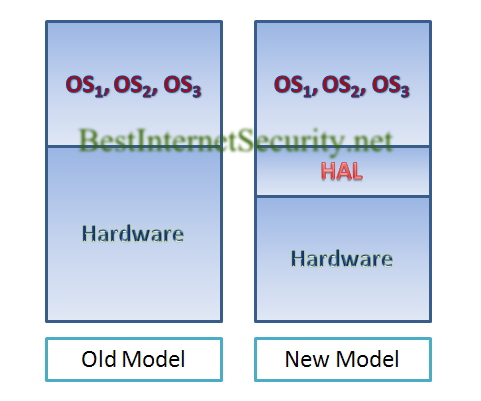
Your software is no longer tied to a particular hardware platform. If your hardware fails, you can migrate your hard-built software platform to another piece of hardware immediately without having to re-build the software from scratch to adapt to the new hardware platform.
From a security standpoint, this achieves the continuity of your desktop system since your software platform is now operating independently from the hardware platform. Among the three security objectives (namely: confidentiality, integrity, and availability) this achieves the last objective.
If you are in a hurry to migrate your existing well-built applications on common OS platforms to VMware HAL, you can try the free VMware Converter, found here: http://www.vmware.com/products/converter/.
And you can also use their free VMware Player to operate your converted VMware virtual machine, found here: http://www.vmware.com/products/player/
Tags: WMWARE, Desktop Continuity, Server Continuity, Availabilty, Business Continuity
Leave a Reply